Two IGET Bar Pro boxes can look almost identical at a glance. Which printed detail tells you what flavour each box says it contains? IGET Bar Pro 10000 Puffs: How to Identify Each Flavour from Its Packaging starts with three checks. First, read the model, find the puff count, and then look for the complete flavour name.
The fruit artwork may look clear even when the smallest word on the label sits outside the frame. Likewise, two boxes can share a bright colour or a familiar fruit without sharing the same printed name. Use the photo notes and reference table below to narrow the possibilities. When the wording stays hidden, a better angle can settle what the first photo leaves open.
How to Identify the Flavour on an IGET Bar Pro 10000 Puffs Box
Start with the outer carton and find the printed product name. Look for IGET BAR PRO, then check that the same carton shows 10000 Puffs. Pay particular attention to PRO when glare, a sticker, or a tight crop interrupts the name. Likewise, check the number and the word PUFFS together so you know what the number describes.

If either detail is outside the frame, ask for a wider photo before using the table. The frame should include all four corners of the front, from the upper flap to the bottom edge. In addition, ask for a second view if the count sits on an adjacent panel. Include a shared corner in both shots so you can see how the two faces connect.
- Confirm the model and count. Read both on the carton you want to identify.
- Locate the flavour wording. Look for a separate block of text and follow it across every line.
- Compare the full name. Match the complete wording against the photo reference and check where the wording appears.
Next, use colour and artwork to decide which reference image to inspect first. A green area on a dark carton can point you towards a green-and-black reference. However, the actual match depends on the letters you can read on your own box. If a hand covers the last word, jot down the visible words and leave the identification open.
Where the Flavour Name Is Printed on Each Documented Box Design
Locate the label on each documented design
Start by working out which surface you’re looking at. A product image can include an outer carton, smaller packs, and a large illustration of the device. First, follow the edges around the face that carries the model name. Then check whether the flavour wording sits inside those same edges.

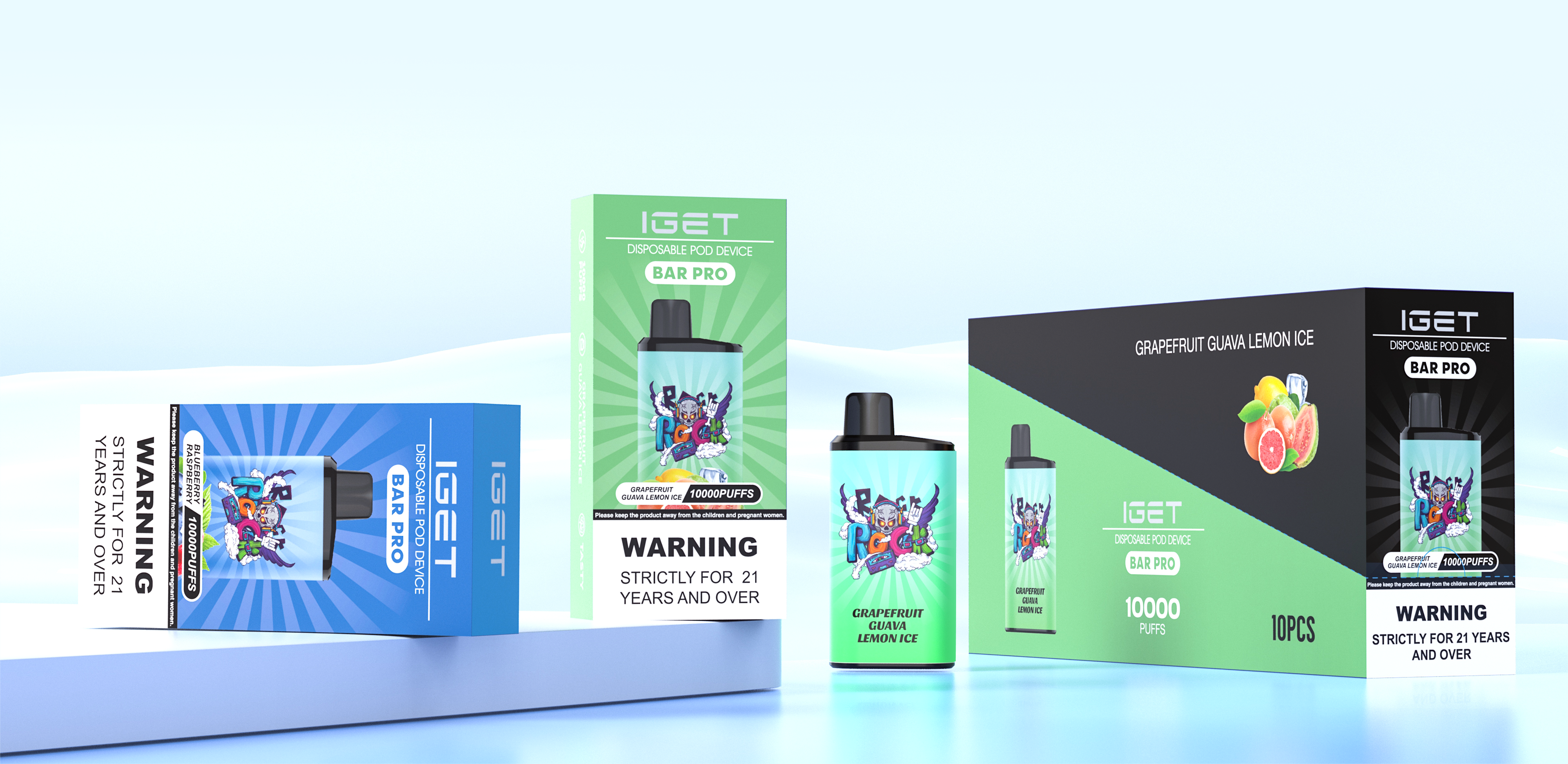
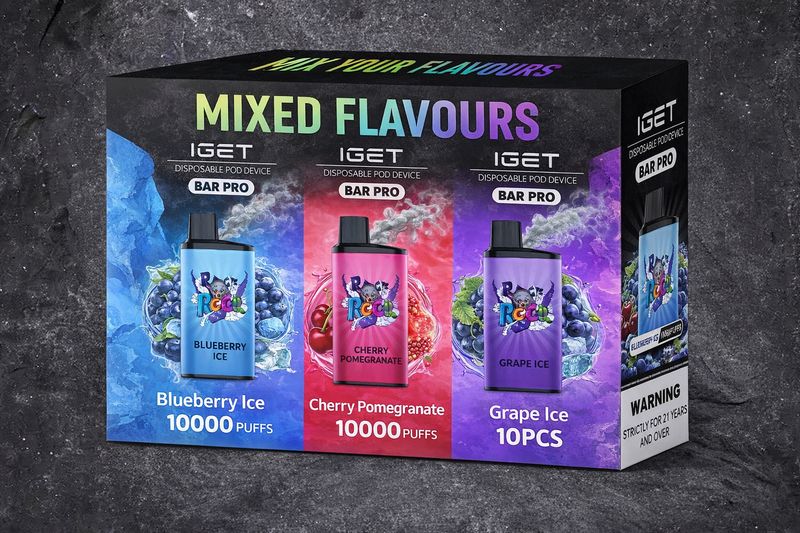
The available display images show how easily outer-carton wording and pictured labels can appear in the same frame. However, they leave the exact placement of some individual-carton labels uncertain. The captions identify the visible landmarks. A straight-on photo of a single carton would establish the label’s position more precisely.
Read the full printed name
Once you find a likely label, follow the text until the entire name comes into view. In Photo A, the wording reported for the pack face is Grapefruit Guava Lemon Ice. Read all four words in order and keep Ice with the name. Meanwhile, IGET BAR PRO identifies the product, and 10000 Puffs identifies the printed count.
A label close-up should show the first letter, the final word, and any punctuation between them. Furthermore, it should keep every line visible in the original order. The public display images leave the original line breaks and typography uncertain, so the table presents the reported names as running text. Use a sharp crop from your own photo to record the literal layout.
Check other panels when the front is unreadable
The reference images establish no readable flavour location on a side, back, top, or bottom panel. Nevertheless, if you have the carton in hand, you can turn it and inspect each face for repeated wording. Hold the front upright before turning it so you can describe which panel you checked. If you find a readable label, photograph it with the adjoining fold visible to preserve that orientation.
IGET Bar Pro 10000 Puffs Flavour Packaging Reference Table
Find a match by the printed flavour name
Use the table alphabetically when you can read the start of the name. If the photo shows mostly colour, begin with the visual cues column and return to the wording once you find a likely reference. The table identifies which surface each reference actually shows. This matters because artwork on a pictured panel can differ from artwork on a standalone carton.
| Flavour wording shown or reported | Dominant colours in the reference | Visible illustrations | Detail that distinguishes the name | Photo and panel |
|---|---|---|---|---|
| Blueberry Ice | Dark outer-carton background with a coloured inset. Standalone front colours remain unverified. | Fruit artwork appears with the inset. Fine details remain uncertain. | Read Blueberry before the shared ending Ice. | Photo B, pictured flavour panel on the mixed-flavour front. |
| Cherry Pomegranate | Dark outer-carton background with a coloured inset. Standalone front colours remain unverified. | Fruit artwork appears with the inset. Fine details remain uncertain. | Read Cherry first and confirm that Pomegranate ends the visible name. | Photo B, pictured flavour panel on the mixed-flavour front. |
| Grape Ice | Dark outer-carton background with a coloured inset. Standalone front colours remain unverified. | Fruit artwork appears with the inset. Fine details remain uncertain. | Read the whole first word, Grape. A crop can also make Grapefruit start this way. | Photo B, pictured flavour panel on the mixed-flavour front. |
| Grapefruit Guava Lemon Ice | Green and black on the pack faces in the display. | Individual illustration details remain unclear in the available display view. | Look for Grapefruit and confirm the middle words Guava Lemon. | Photo A, outward-facing pack in the stepped display. |
Three rows point to flavour panels pictured on a mixed carton. The remaining row points to a pack face in a display image. Consequently, the strongest standalone-box cue in this set is the green-and-black appearance reported for Photo A. The three pictured flavours establish comparison wording, while their individual carton layouts still need clear front photos.
Connect each row to a packaging photo
Read the photo and panel columns together before comparing the artwork. For instance, the dark area behind Blueberry Ice belongs to the mixed outer carton in Photo B. Record the colours inside the pictured panel separately if you can see them clearly. If the image blurs their boundary, describe the colours as unclear.
Likewise, record illustrations at the level the photo supports. If you can make out a fruit cluster but cannot identify the fruit, write fruit artwork visible. Use no artwork visible on the full panel only when you can inspect the entire face. When a crop or reflection hides part of the design, record which area it hides.
Keep the wording attached to the exact pack you read. For example, a shelf photo might show two neighbouring fronts with one visible puff count between them. Trace the carton edges before assigning that count to either one. If you can read the flavour on one pack and the count on another, request a clearer shot of the first pack.
Confirm the best match
Suppose your photo shows a green-and-black pack like those in Photo A. First, use that colour cue to find the Grapefruit Guava Lemon Ice row. Next, confirm the model and count on your carton, then read from Grapefruit through Ice. If all four words match, you can record the same printed flavour.
Now suppose the frame ends after Grapefruit Guava. In that case, write Unconfirmed — Grapefruit Guava visible and ask for the rest of the label. Specifically, the missing view needs to show whether Lemon Ice follows. A well-placed close-up can resolve that question even if the original shot remains useful for showing the full box.
How to Tell Similar-Looking Flavour Boxes Apart
Compare boxes with similar colours
Photo B gives you a side-by-side comparison against a shared dark background. Among its pictured panels, Blueberry Ice and Grape Ice both end with the same word. If you can see only Ice, move your attention to the preceding word. Specifically, look for the whole word Blueberry on one panel and Grape on the other.
The comparison applies to the artwork on the mixed carton. A side-by-side pair of standalone box fronts would be needed to verify that their individual colours also look similar. Meanwhile, if you have the two cartons in front of you, stand them upright in the same light. Photograph both faces at equal distance so one box’s shadow or angle does not distort the comparison.
Compare boxes with similar artwork or shared wording
Grape Ice and Grapefruit Guava Lemon Ice illustrate a different problem. Both can leave you with the letters Grape when the right edge of the label disappears. Therefore, the critical area is the space immediately after those five letters. Check whether the word ends there or continues into fruit.
Then follow the next printed words. In the shorter name, Ice follows Grape. In the longer name, Guava Lemon appears before the final Ice. If the label wraps across lines, include the end of the first line and every line underneath when you take a close-up.
A printed word may also run close to fruit artwork or a graphic edge. When that happens, shift the camera angle slightly to reduce reflections, then check the letters again. However, keep a straight-on shot for comparing the layout and reading order. Together, the two views can show both the whole label and the characters that glare covered.
Decide how much the visuals can tell you
Use colours and illustrations to narrow the list, especially when a photo shows several boxes at once. Then read the entire label on the specific carton you want to log. If a fruit drawing suggests one flavour and the wording clearly names another, record the wording. When the text stays incomplete, keep the colour or artwork as a clue and leave the flavour unconfirmed.
What to Check When the Flavour Name Is Hidden in a Photo
Find a clearer view
Start with the original file or the widest available crop. A screenshot may cut away a lower edge that the original photograph includes. Likewise, an alternate angle may show letters hidden behind a reflection or another box. Look through those views before enlarging a small screenshot of the label.
Next, zoom in on the original at its full resolution. Check each line for complete letters, especially at the edges and folds of the panel. If you use a documented photo to guide your search, match the same type of surface first. For example, Photo B can help you locate its pictured flavour panels on the mixed carton.
Ask for the view that resolves the match
Write down exactly what you can see before asking for another image. For instance, Guava Lemon visible, opening and ending outside the frame describes the gap clearly. Then ask for a straight-on shot of the full carton and a sharp close-up of the entire flavour block. If the visible wording continues around a fold, include the adjoining face and the shared corner.
- Place the box upright and keep its front parallel to the camera.
- Use diffuse light and move the light source if the carton reflects it.
- Tap to focus on the small lettering and keep room around every line.
- Send the original image so the reader can zoom in on individual letters.
Resolve discrepancies between photos and captions
A caption or filename can help you find the right image in a folder. However, a shared listing or reused filename can place one flavour name beside a photo of another. If the text conflicts, record the wording on the visible box and note the discrepancy. Before assigning the flavour, make sure the full-box image and close-up show the same carton.
In practice, a shared corner, crease, or sticker can help you connect the two views. Better still, ask for a single photo that includes the model, count, and complete flavour label. When the image makes all three readable, you can enter the name directly from the carton. If the photos still disagree, leave the identification open until you can tie the label to the box.
Can the Same Flavour Appear in More Than One Packaging Design?
Two cartons with different artwork could carry the same printed flavour name. To confirm a packaging variation, read the complete flavour wording on both cartons. Then verify IGET BAR PRO and the 10000 Puffs marking on each one. A readable photo of each carton gives you a way to check whether the change involves the layout, colour, or illustration.
The references here document one green-and-black displayed appearance for Grapefruit Guava Lemon Ice. Meanwhile, Blueberry Ice, Cherry Pomegranate, and Grape Ice appear as pictured flavour panels on the mixed carton. These views do not establish two standalone cartons with the same wording. Additional appearances for each flavour therefore remain unverified.
If you come across a possible second design, photograph the same face on both cartons. Compare the label’s position against a fixed landmark such as the product name or a panel edge. Likewise, record changes to the dominant colours or illustrations only when the complete face is visible. A second row in the reference table should connect those differences to a readable photo.
Finally, add a market or date only when the source supports it for that specific design. The country of a seller’s website tells you where a listing appeared. A photo of the carton can establish what its design shows, while separately documented information can establish its market or date. If all you have is the image, record the visible design and keep those details open.
Conclusion
Confirm IGET BAR PRO and 10000 Puffs on the carton first. Then read the complete printed flavour name, including any short word at the end. Use colours and illustrations to find a promising reference, and check the pictured panel or pack face when the wording is hard to see.
Take a straight-on photo of your box and compare its full flavour label with the reference table. If the label is hidden, capture the panel shown in the matching reference photo and include a sharp close-up.