

A light flashes on your INGOT during a draw. What does it tell you about the battery? The answer depends on your exact model, which part of the display changed, and when you noticed the change. ALIBARBAR INGOT Battery Indicators and Their Meanings starts with those three clues.
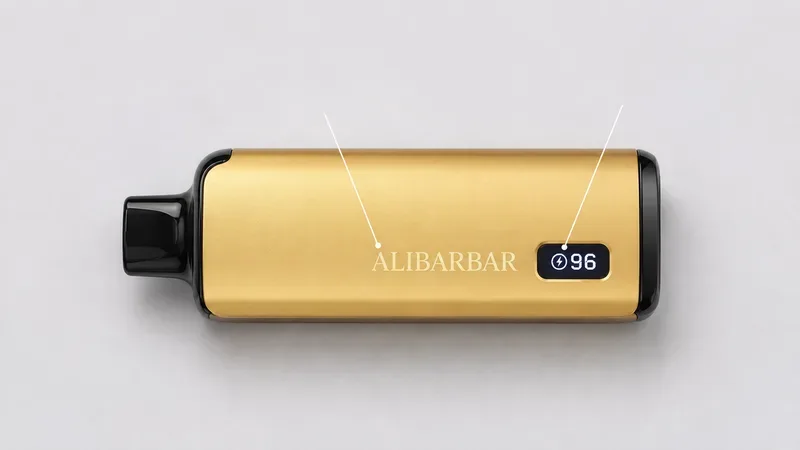
ALIBARBAR confirms that the INGOT 9000 tracks both battery and e-liquid levels. However, its public product pages give limited detail about specific warning patterns. Use the table below to match your model, check what the display measures, and see whether charging applies. Then compare any unexplained reading with the instructions that came in your box.
ALIBARBAR INGOT Battery Indicators and Their Meanings
| Model | What you see | Documented meaning | What to do next |
|---|---|---|---|
| INGOT 9000 | A side LED display with battery and e-liquid readouts. | The display tracks both levels separately. ALIBARBAR lists the model as non-rechargeable. | Identify which readout changed. Check the insert or ask support about unexplained flashes. |
| INGOT 3600 | The INGOT 3600 name on the box. | ALIBARBAR says this model needs no charging. Its lineup summary gives no indicator guide. | Check the unit’s insert for any lights or symbols and their meanings. |
| INGOT 15000 | The INGOT 15000 name on the box. | ALIBARBAR lists the model. Its lineup summary gives no display or charging details. | Confirm the features and charging instructions for your unit using its insert or ALIBARBAR support. |
Start with the part of the display that changed
On the INGOT 9000, the same side display presents two different readings. For instance, the e-liquid level can look low while the battery still shows a higher level. Read the label or symbol beside the value before deciding what the screen is telling you. If the symbol is unfamiliar, compare it with the diagram on your insert.

Where to look up an unfamiliar warning
ALIBARBAR’s product lineup confirms what the side LED display monitors, and its homepage confirms that the INGOT 9000 is non-rechargeable. However, those pages offer limited detail about specific flashes or warning symbols. For a pattern outside the table, start with the insert for your exact model. If the insert gives no explanation, send ALIBARBAR support the model name and a description of the display.
For example, “The battery readout flashed three times after the draw ended” gives support a specific event to investigate. Include any visible number or symbol and say whether the other readout changed. Additionally, mention if the pattern appeared when the device was sitting unused.
How to Identify Your Exact ALIBARBAR INGOT Model
Find the full model name on the packaging
Start with the box, especially if the device itself only says INGOT. Look at the front panel, the ends, and the area near the barcode for the full product name. Specifically, record the number that appears with INGOT. That number helps you match the device to the right row in the lookup table.
For instance, a box might say INGOT 9000 on the front and list the flavor on a smaller label. Write down the full model name first, then keep the flavor as an extra detail for support. Additionally, save any batch or lot number printed on the label. A clear photo can capture these details even if the printing is tiny.
However, an order confirmation might shorten the product name to “ALIBARBAR INGOT.” Open the full order details and compare the listing title with the box. Meanwhile, check whether the insert names the same model. If the seller’s listing and the packaging disagree, show support both descriptions before following any charging instructions.
Use the insert to confirm the features
Next, look for a drawing of the device or a section that explains the display. Match the drawing to the position of the screen, the labels beside the readings, and any controls mentioned. For instance, if the insert points to a side display, look for that display on your device. If the picture differs significantly, include a photo of the unit when you contact support.
Specifically, look for an explicit statement about whether the device supports charging. For the INGOT 9000, ALIBARBAR’s homepage already gives the answer. The manufacturer identifies it as non-rechargeable. For another model, use the charging instructions that clearly name your version or ask support to confirm.
- Still have the box? Photograph the model name and the specification panel.
- Only have the device? Photograph any printed markings and check your order history.
- Found conflicting details? Send ALIBARBAR support both model names and ask which instructions apply.
If you bought multiple INGOT devices, match each one to its own packaging before interpreting a display. Otherwise, an insert from a different box can send you looking for an icon or charging feature your unit lacks.
How to Read the Battery and E-Liquid Indicators
Match the reading to its label or symbol
First, look at the symbol or label next to the reading that changed. A battery outline commonly represents remaining battery charge, while a droplet commonly represents e-liquid. However, use the diagram for your model to confirm unfamiliar icons or positions. ALIBARBAR describes the INGOT 9000 display as a way to monitor both levels.

Specifically, look for a percent sign if the display shows a number. For instance, a battery reading of 25% indicates roughly a quarter of the displayed charge scale. The reading alone cannot tell you how many draws remain. Likewise, 25% beside an e-liquid symbol refers to the displayed liquid level.
If your display uses bars, count the filled segments next to the relevant symbol. For example, one filled segment out of four puts the reading near the low end of that scale. However, the manufacturer would need to document the thresholds before you could assign an exact percentage. Give support the segment count as you see it.
Read the two levels independently
For instance, imagine the battery reading drops while the e-liquid reading stays in the same range. The display shows lower charge alongside an unchanged liquid reading. Conversely, a falling liquid reading with a higher battery reading points to less e-liquid on the displayed scale. Each indicator answers a different question about what remains in the device.
Similarly, two readings can change close together. Look at each icon and value before deciding which one prompted you to check the screen. If both readings look steady but one symbol flashes, write down the symbol and the flash pattern. That observation gives support more detail than a single number taken after the event.
Compare readings taken under similar conditions
For instance, suppose you see two bars during an ordinary draw and one as the screen fades. Record both observations and when each appeared. If your insert describes how long the display stays visible, use that timing as a reference. Otherwise, compare readings from the same point in the display’s normal sequence.
Additionally, separate the level from anything that makes it harder to read. A dim segment or briefly missing symbol changes what you can see. If the display lights clearly but the value looks unusual, report the exact value. If you cannot make out the value at all, describe which portion of the display is hard to read.
How to Tell When a Rechargeable INGOT Is Charging or Full
Confirm that charging applies to your unit
First, find an explicit statement in the manufacturer’s instructions that your exact model supports charging. The official product pages confirm that the INGOT 9000 is non-rechargeable. Therefore, skip every charging check in this section if you own that model. A low battery reading on the INGOT 9000 calls for checking its end-of-use instructions.
For another INGOT model, look for instructions that name your device and describe how to connect it to power. Specifically, check the specified cable, power source, and any conditions for charging. If you find an opening and cannot identify its purpose, leave it alone. Ask ALIBARBAR to confirm the model and the opening’s purpose.
Look for the documented charging signal
Once you confirm charging support, follow the connection steps in the insert. Then watch the part of the device that the instructions identify as the charging indicator. For instance, a guide might say to look for a moving battery symbol. Use that interpretation only if your own instructions describe the same behavior.
Additionally, check whether the instructions say how long the charging indicator stays visible. A brief light at connection and a continuous light are different observations. If the light disappears before you see the documented full signal, note how long it lasted. Meanwhile, consult the insert before drawing a conclusion from the dark screen.
The FDA recommends charging vapes on a clean, flat surface where you can see them, away from easily flammable items. It also advises against charging in extreme temperatures. Most importantly, follow the manufacturer’s directions for your device. If those directions are missing, contact the manufacturer before trying a charging setup.
Use the model’s full-charge cue
Specifically, find the wording or illustration that explains how the device shows a completed charge. If the guide defines 100% beside the battery icon as full, use that reading. If it describes a particular light changing or going out, check for that exact sequence. The e-liquid readout serves its own purpose throughout this check.
However, if the specified full-charge cue never appears, note the charging indicator you saw and when it changed. Include the battery value at the start and the last value you could read. Also, tell support which approved equipment you used and how long it had been connected. Follow the manual’s instructions for disconnecting the device.
Why the INGOT Battery Indicator Blinks
Notice where the blink appears and when it starts
A blink can be easy to miss, especially if it happens just as you lower the device. First, identify whether one icon, one number, or the entire display flashes. Then note when the sequence begins and whether any steady reading appears afterward. ALIBARBAR’s public lineup explains the INGOT 9000 display’s purpose but offers limited guidance on flash patterns.
For instance, you might see the battery symbol flash twice immediately after a draw. In another case, both readings might flash together while the device sits on a table. Those details give support two different events to investigate. Furthermore, knowing whether the screen returns to a steady reading can help support understand the sequence.
- During a draw — note which readout flashes and whether its number or bar count changes.
- Just after a draw — count any clear pulses and note what stays visible afterward.
- While idle — record whether the flashes repeat in groups and how long the pauses last.
- While connected to power — use this observation only for a model with confirmed charging support.
Check the steady reading alongside the flash
If the battery gauge already sits at its lowest mark, tell support that it was low when the flash appeared. A low reading and a flash occurring together are useful clues. However, the model’s instructions must confirm whether that sequence is a low-battery warning. Use the same approach if the e-liquid gauge sits at its lowest mark.
For example, imagine the e-liquid icon is steady while the battery icon pulses three times. Report the three pulses, the steady liquid icon, and the battery reading you saw before the pulse. If the entire screen flashes too quickly to count, describe it as a rapid burst. A description you can verify is more helpful than a guess.
Similarly, a pause between groups matters when you describe the sequence. If you see two flashes, a pause, and two more, report those as two groups of two. If the color changes midway, note the order of the colors as well. Check the insert for a matching sequence, including the timing and the part of the display involved.
Get an answer for a pattern the insert does not explain
If the insert gives a matching warning, follow the instructions printed with that warning. Otherwise, send support the exact model, the affected readout, and the timing. Additionally, include whether the device responded normally before the flash appeared. If you already have a short recording, attach it so support can see the pattern directly.
Most importantly, stop using or charging a device that leaks, swells, smells burnt, or becomes unusually hot. If you see smoke or fire, move away and contact local emergency services. For other unusual behavior, contact ALIBARBAR before recreating the pattern. A written description and a photo of the packaging are enough to start the conversation.
What to Do When the Battery Display Is Blank or Stuck
Check whether the screen is idle or unreadable
Start by checking the insert for when the display should light up and when it should go dark. For instance, if it describes a short display window, a dark screen after that window fits the instructions. However, a screen that stays dark when the guide says it should light warrants a closer look. Note whether you last saw it working during a draw, afterward, or while idle.
Then examine the screen in ordinary light from another angle. Specifically, look for glare or a visible mark on the outside that could obscure a segment. If the display is partially readable, write down which part you can see. A working liquid indicator beside a blank battery area gives support a more precise description than “the screen went blank.”
Record what appears stuck
A stuck reading can mean the number stays fixed, one segment never changes, or an icon remains on unexpectedly. First, write down the exact value and the last time you remember seeing a different reading. For instance, “The battery has shown two bars since I opened the box” gives a starting point. If you only checked twice, include that detail too.
However, a bar can stay visible across several observations because each segment may cover a range of charge levels. Check whether the insert describes the scale or how it updates. Similarly, note if both gauges appear fixed or if the e-liquid reading still changes. A photo can show missing segments or an icon that stays visible when the display should turn off.
Additionally, keep track of what happened before the change. Did the screen go blank on first use, after several ordinary uses, or after the device got wet? Include any drop, visible damage, or unusual heat in your report. If the device appears damaged, stop using it and ask the manufacturer how to handle it.
Choose the next step for your model
- INGOT 9000 — check the insert for display and end-of-use instructions. Keep the device disconnected from power.
- Confirmed rechargeable model — check the documented charging indicator using the approved setup if the unit is undamaged.
- Unconfirmed model — ask ALIBARBAR to identify the device and confirm its charging capability from the packaging and markings.
If a confirmed rechargeable unit shows no charging signal, report what the instructions said to expect and what you observed. Also, mention whether the entire screen stayed blank or only the battery icon failed to appear. For a newly opened device, keep the box and proof of purchase in case support or the seller requests them. Leave the housing intact.
Finally, if the device has reached the end of its life, ask your local waste authority where to take it. In the United States, the EPA recommends taking used e-cigarettes to a household hazardous waste collection site. Keep them out of household trash and curbside recycling. If the device is damaged, ask the collection site for handling instructions before transporting it.
Conclusion
Start with three checks whenever your INGOT shows an unfamiliar reading or flashes. First, confirm the exact model on the packaging. Then identify which readout changed and note when it happened. The INGOT 9000 tracks battery and e-liquid separately, and ALIBARBAR lists it as non-rechargeable.
Next, match the model printed on your packaging to the lookup table and check the insert for the signal you saw. If the reading or flash pattern remains unexplained, send ALIBARBAR support the model name and a short video of the display. Include the affected icon, the timing, and the last steady reading you could see.